Virtualization?
Use a single machines' hardware to run multiple virtual machines in it.
Key point:
- Use a system's Hardware.
- Allocate CPU/RAM/Storage to VMs.
- Cannot exceed the CPU/RAM/Storage that is available on physical hardware.
Benefits:
- Better use on H/W resources.
- assume 2 physical servers that were running specific services for our network.
- they may only be using less of CPU/RAM/Storage.
- if we do virtualizatioin, we can put both of servers into one physical machine.
- both server to run into one physical machine.
- -> utilizing more of the CPU/RAM/Storage on that box.
- Flexibility : VMs can be moved between different data center.
- Recovery : VMs can be saved as files.
- Power Saving/Reduce footprint
- we can consolidate multiple physical pieces of hardware into one smaller piece of hardware.
- Researching OS and other S/W (sandbox)
- you can test things without having a physical unit.
*sandbox : secure, isolated environments used to test, ananyze or run code, applications or programs.
*footprint : the physical space a device takes up, or the amount of memory a program uses.
Hypervisor

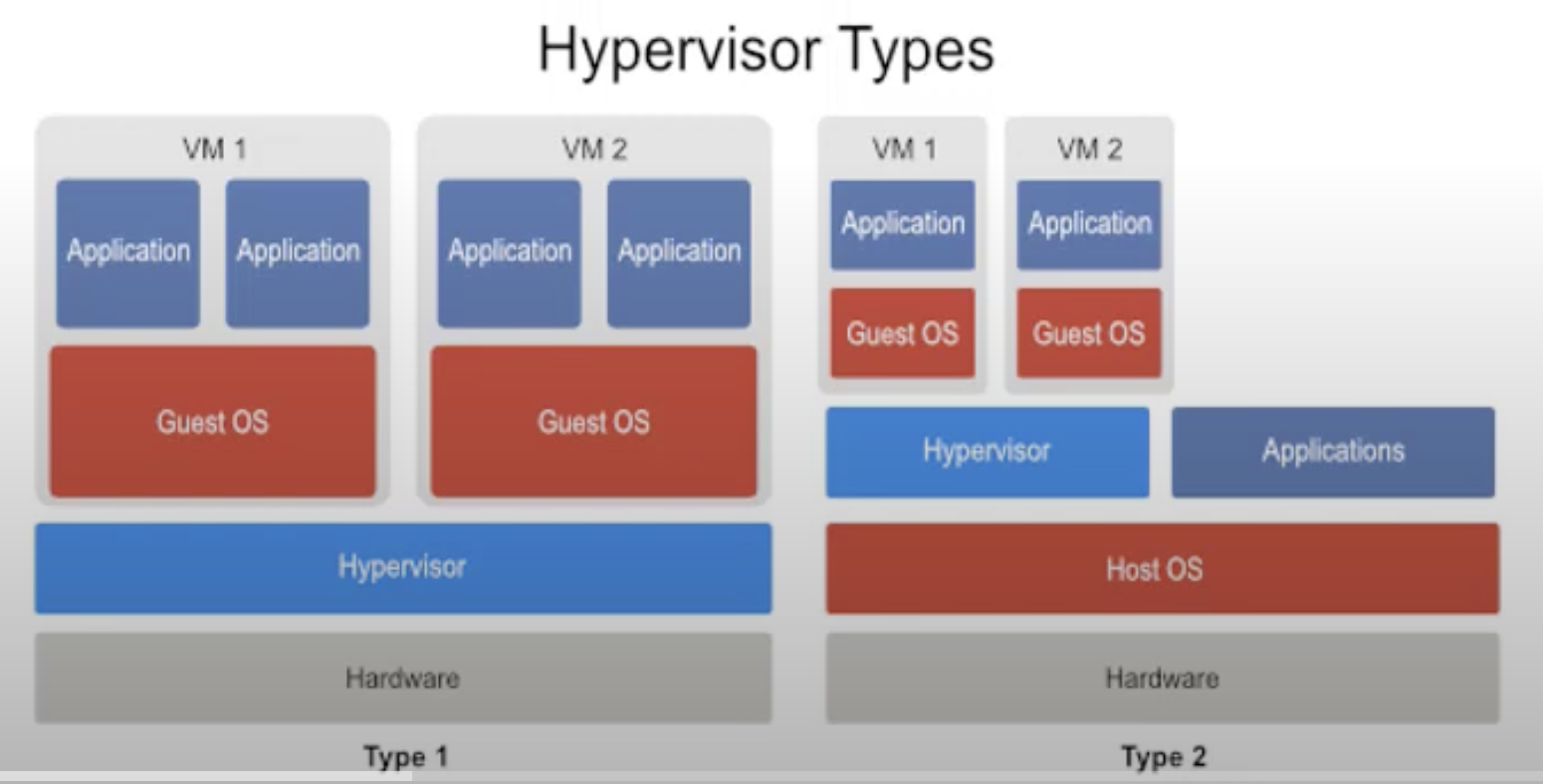
Type 1 : Bare Metal Hypervisor
- installed directly on a bare metal server
- control hardware directly -> less overhead, can use hw resources more effectively
- administer VMs
ex)
VMWare vSphere/ESCi -> the hypervisor to use the VMs
Microsoft Hyper-V
Citrix XenServer
Type2 : Hosted Hypervisor
- installed on a host OS
- use hardware through Host OS -> have more overhead than Type 1 hypervisor
- use existing environment -> convenient to install
ex)
Oracle Virtual Box
VMWare workstation / Fusion
Paralles (Mac)
VMs vs Containers
VMs build their own OS but Containers don't. They use the existing Host OS.
Virtual Machine
- HW level of virtualization (using hypervisor)
- Virtual Machine is working at the HW level.
- they create the separate work stations, separate servers out of one.
- there are Type1, Type2.
- with hypervisor, we can create different machines out of our server.
- we're interacting with what we're thinking is HW,
- but that's being managed for us by the hypervisor to what actually HW is.
Container
- OS level of virtualization (don't use hypervisor)
- Container is working at the OS level.
- we can run many dozens of containers in one instance of Host OS.
- It's kind of process isolation.
- Make sure that applications can only see what's absolutely necessary for them to run and nothing else.
- They shares the OS and Kernel, but it's appear to each container as if they have their own OS.
- only what's installed in them is the libraries that are needed, scripts, code, everything that we need to run our application.
ref:
https://youtu.be/L8A9PHeyRrY?si=n8tdpbN1XeL8Mry5
https://youtu.be/nvdnQX9UkMY?si=-S75LlQPu9OihdOk
https://youtu.be/wtumA3WqWs0?si=99_hYq1qNkaqdfaR
https://youtu.be/QMhFLv8kJUc?si=KP7eYFVnp8onuKRM
'정글 > 컴퓨터 시스템' 카테고리의 다른 글
| 동적 메모리 할당 (Dynamic Memory Allocation) (2) | 2025.04.14 |
|---|---|
| [컴퓨터 시스템] 3장 (1~3) (0) | 2025.04.05 |